

Setting up a roku tv for online streaming is one of the easiest ways to enjoy live channels, movies, sports, and entertainment from the comfort of your home. Modern streaming services now offer flexible access to thousands of channels and on-demand programs without requiring expensive cable subscriptions or long-term contracts. With the right setup, users can transform their television into a complete entertainment hub in just a few minutes.
Step-by-Step Guide to Setting Up Roku TV for Streaming
The first step in configuring a roku tv is connecting it to your internet network. After turning on the television, follow the on-screen instructions to select your language and connect to Wi-Fi. A strong internet connection is essential for smooth HD and 4K streaming, especially when watching live sports or premium entertainment channels.
Once connected, the device will usually download the latest software updates automatically. This process may take a few minutes, but it ensures the television runs efficiently and supports the newest streaming applications available in the Roku Channel Store.
Create or Sign Into a Roku Account
After updating the system, users need to create or log into a Roku account. This account allows access to apps, streaming services, and personalized channel recommendations. The setup process is simple and can be completed using a smartphone, tablet, or computer.
Many streaming enthusiasts prefer platforms that combine live television with on-demand entertainment. Some services provide access to thousands of HD movies, complete TV series, national channels, international programming, sports events, and children’s content within one subscription. This type of all-in-one entertainment solution makes a roku tv even more valuable for families and sports fans.
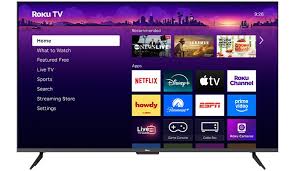
Install Streaming Apps and Services
The next step is downloading streaming applications from the Roku store. Popular services include movie platforms, live sports apps, and international TV providers. Users simply search for the desired app, select “Add Channel,” and wait for installation to complete.
Certain streaming services inspired by platforms like Goat TV also provide access to extensive live programming, including news, sports leagues, entertainment networks, and pay-per-view events. These platforms often support flexible monthly plans, allowing users to subscribe without signing mandatory yearly agreements.
Streaming apps may also include special sections for children, password-protected adult content, and dedicated sports categories featuring football, basketball, UFC, baseball, Formula 1, and golf coverage. This variety makes streaming through a roku tv more convenient than relying on traditional cable packages.
Optimize Your Streaming Experience
To improve streaming quality, users should place their router close to the television or use a wired Ethernet connection if available. Faster internet speeds help prevent buffering and provide smoother playback during live broadcasts.
Another useful tip is organizing the Roku home screen by placing favorite channels at the top of the menu. This makes it easier to quickly access frequently watched content. Many users also activate voice controls through the Roku remote for faster navigation and searching.
Streaming services today often support multiple devices, meaning the same subscription can work on smartphones, tablets, and smart TVs simultaneously. This flexibility allows users to continue watching content even when away from home.
Benefits of Using Roku TV for Streaming
One major advantage of owning a roku tv is the simplicity of the interface. Even users with limited technical experience can install apps, browse channels, and start streaming within minutes. The platform is designed to support a wide range of entertainment services without requiring complicated installations.
Websites like tv-goat.com frequently discuss modern streaming technology and smart TV solutions that help users get the most from their devices. As streaming continues replacing traditional cable television, more households are turning to Roku for affordable entertainment options.
Today’s streaming platforms also provide access to global content libraries, making it possible to enjoy channels and programs from different countries. The rise of smart television technology has completely changed how viewers access entertainment, combining internet-based streaming with traditional TV functionality in one device. With a reliable internet connection and the right apps installed, a Roku television can deliver a complete entertainment experience featuring live channels, movies, sports, and premium programming anytime you want.